Deploy an endpoint for the base EfficientNet model
The base EfficientNet model provides image classification on the 1000 ImageNet labels.
Custom model
To create a custom model to classify images in based in custom labels see the Training page.
1. Subscribe to the offering
- Log in to AWS with a user with administrative privileges
- Navigate to the EfficientNet-B3 listing on the AWS Marketplace
- Click
Continue to Subscribe -
Click on
Accept offer(it might take 1 or 2 minutes for AWS to accept the offer).Note that there is no charge for subscribing to this offering only when launching the model on SageMaker
-
Once you are subscribed click
Continue to Configuration - On the
Configure and launchpage- Select
SageMaker consoleas the Launch Method (you can also use the AWS CLI) - Select the version and region where you want to launch the model endpoint
- On
Amazon SageMaker optionsselectCreate a real-time inference endpoint
- Select
- Click on
View in Amazon SageMaker
2. Create the endpoint
In the Create endpoint page:
- Select a
Model namee.g.efficientnet-b3 - Select or create a new IAM role for executing the model
- Under
Container definition- Verify
Use a model package subscription from AWS Marketplaceis selected
- Verify
- Click on
Next - Select an
Endpoint namee.g.efficientnet-b3 - Under
Attach endpoint configurationselectCreate a new endpoint configuration - Under
New endpoint configuration- Verify the new model (e.g.
efficientnet-b3) is listed underProduction variants - Click on
Editin theActionscolumn and select the instance types you want for the endpoint. The minimun recommended isml.c5.xlarge - Click on
Create endpoint configuration
- Verify the new model (e.g.
- Finally click on
Submit
A new endpoint will be created (this can take a couple of minutes).

3. Making a query
With the endpoint ready you will have an URL to make predictions, for example:
How to query the Invocations endpoint
For complete documentation on how to query this endpoint see the AWS Docs: InvokeEndpoint documentation in AWS.
The key part being how to handle the AWS Signature Version 4, for example using Python.
A simple example using boto and this photo as input:
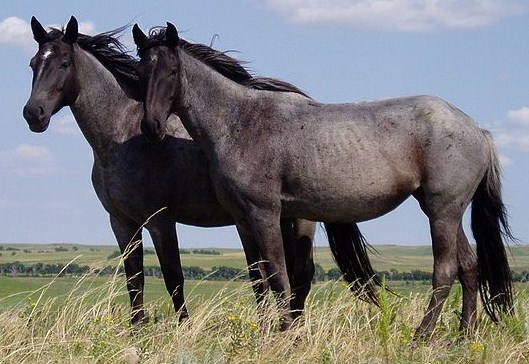
You can use the Python boto3 library to make a query.
import boto3

client = boto3.client("sagemaker-runtime")
endpoint_name = "efficientnet-b3"

content_type = "image/jpeg"

with open("validation/horses.jpg", "rb") as f:
    payload = bytearray(f.read())

response = client.invoke_endpoint(
    EndpointName=endpoint_name, ContentType=content_type, Body=payload
)

print(response["Body"].read())
Response:
["sorrel","cowboy hat, ten-gallon hat","hartebeest","worm fence, snake fence, snake-rail fence, Virginia fence","horse cart, horse-cart"]
Sorrel
Note that sorrel is a type of horse.
Full API docs
For the complete documentation of the API including the different inputs and responses and more ways to query the Invocations endpoint see the API page.